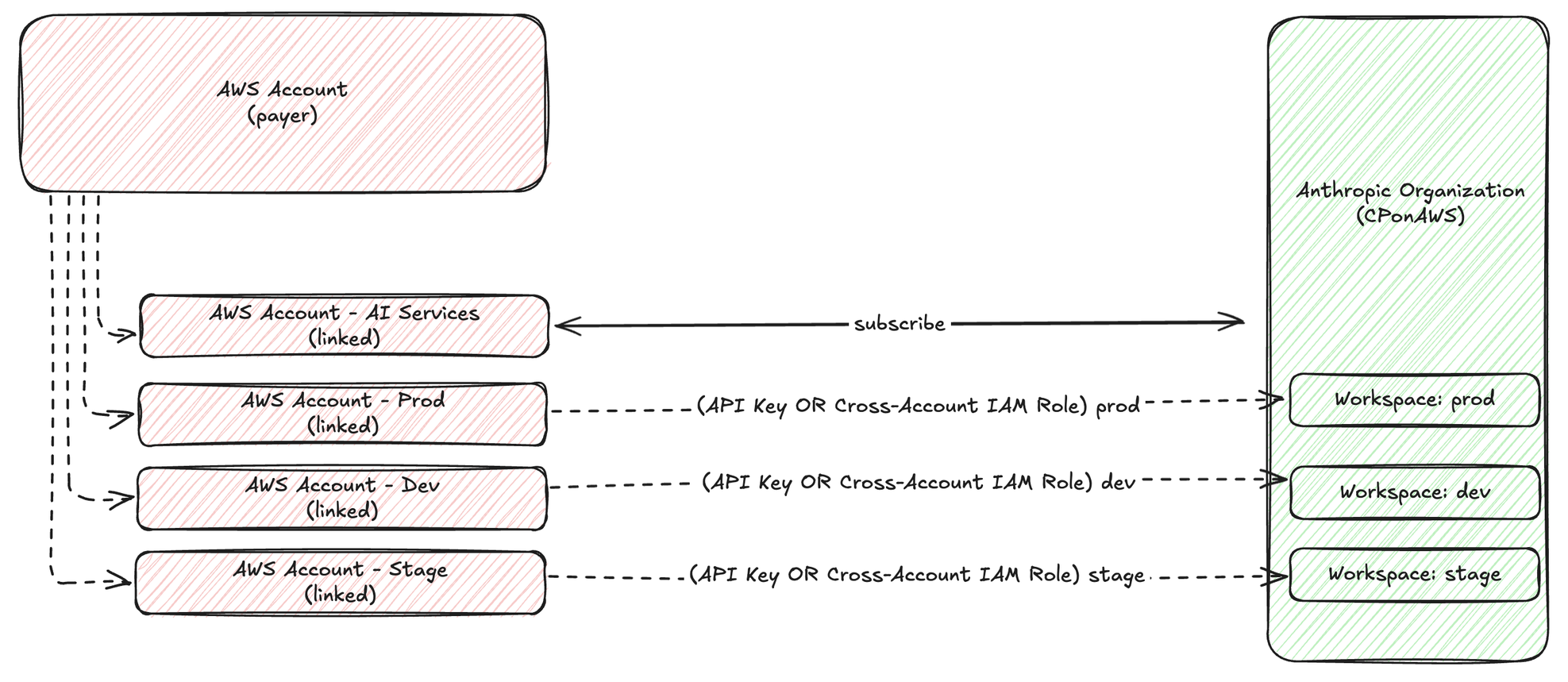
You need Claude Platform on AWS (CPonAWS) inference from three environments: production workloads on AWS, developer laptops for local iteration, and external services on other cloud providers or on-premises continuous integration and continuous delivery (CI/CD) pipelines. Each environment has different authentication requirements, but all should share a single subscription with workspace-level isolation between production and development traffic. For organizations with additional environments, create a workspace per team or workload and repeat the cross-account role pattern for each. This post walks you through the complete setup. You will deploy a dedicated AI Services account within your organization and configure cross-account SigV4 for AWS workloads. You will also generate workspace-scoped API keys for developers and wire up OIDC federation for external environments. Every step includes a CLI command, console instruction, or code snippet. If you’re evaluating which account structure is right for your organization, or which authentication path fits your workloads, see the related Architecture Patterns and Authentication Paths posts. This post picks up where those decisions end: a complete, step-by-step implementation. The architecture The dedicated AI Services account pattern places the CPonAWS subscription in a dedicated AI Services linked account within your organization. This account owns the subscription, workspaces, API keys, and cross-account roles. Workload accounts don’t touch the subscription directly: they assume roles into the AI Services account to make infer
Source: AWS Artificial Intelligence